
Remote Control Operation Instructions
A. Button Functions
1. Raising/Lowering
Press and hold the up " " button to raise the mount. Press and hold the down "
 " button to lower the mount. (Tip: Clear all obstacles within the range of motion.)
2. Memory Setting
Long press the “mem1” or “mem2” button for 2 seconds until you hear a beep, indicating that the current position has been saved. The “mem1” and “mem2” buttons can each store a different position.
3. Recall Memory
Press the “1” or “2” button and the mount will automatically move to the position saved in the corresponding button “mem1” or “mem2”. Press any button to stop motion.
4. Default Setting
Short press the “OK” button and the mount will automatically retract to the highest position. Press any button to stop motion.
5. Reset Mode
Disconnect the power supply cord. Wait for 10 seconds and reconnect. Long press the “OK” button for
5 seconds until you hear a long beep. The mount will move upward to the highest position and the control box will emits a beep. It will then move downward to the lowest position and the control box will emit two beeps. Note: The remote control is powered by two AAA batteries (not included).
B. Pairing the Remote Control to the Control Box
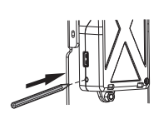
STEP 1: When the mount is powered on, press the small button on the control box with a thin
tool as shown. The unit will emit a beep, indicating that the control box is on standby for
remote pairing.
STEP 2: Press the “OK” button on the remote control and the control box will repeatedly beep for
approximately 10 seconds indicating that the remote control is being paired. The
process will be finished automatically when the beeps stop.
Note: To clear stored memory when pairing a new remote control press the small
button on the control box until you hear a beep, then hold for 10 seconds to erase the stored memory. The process is completed when you hear two beeps.
Comments
0 comments
Article is closed for comments.